Posts

Free Twitter Bootstrap Admin Theme

Image
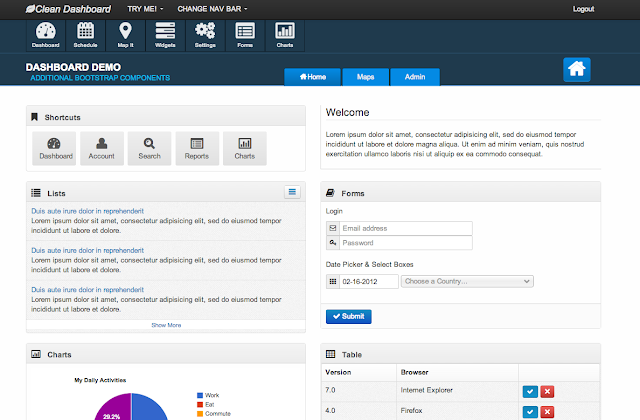
Introducing Responsive Clean Dashboard Bootstrap UI Theme

Java Developers Need To Be Using Lombok

Lombok is a Java library meant to simplify the development of Java code writing. This article deals with writing classes that need getters/setters, override equals, hashCode, toString and/or offer a copy constructor. Way to go Java! You just made writing a simple class cumbersome. Project Lombok will make your day if you haven't seen it yet.

Adding Groovy Sources to Maven Build Path

Say you want to run a groovy class method from your Java project in Maven. You've placed the script file at src/main/groovy/script/MyGroovyScriptClass.groovy . In Java, you would load the class and execute its method like so:

Ignore Header and Trailer Lines During Java InputStream Read

Ignore first + last lines in a file After beating my head against the wall for some time, I was finally able to come up with a solution for this. Say you want to hand off an InputStream or InputStreamReader to an underlying API. The problem is that your input stream may have a header or trailer. Those header/trailers differ from the underlying format. This is commonly true for CSV, EDI, and fixed length file types. So if you want a CSV file parsed by a Java API like the Smooks api, you will need to hand the framework an InputStream.
Grails Part 5 - Adding Basic Security

Click here to view the full tutorial Continuing series: Developing a Grails Web Application. Tutorial will : walk through steps of creating a robust Grails web application. Application name: grails-mongo-demo The Goal: To track and record persons addresses. This application will use the Grails Framework to develop a web application using: 1. MongoDB 2. Spring Security 3. Apache CXF 4. Jetty Web Server 5. Maven build integration  => Removed upon Request Previous Post: Grails Part 4 - Enhanced UI Design w/ tw Bootstrap View Project on Github These Instructions Will Walk Through: Configuring Spring Security Plugin Adding static URL maps Bootstrapping in security data SecurityTagLib - Conditionally display gsp content Configure Security Pages with Twitter Bootstrap UI

Grails Part 4: Enhanced UI Design w/ Twitter Bootstrap

Click here to view the full tutorial Continuing series: Developing a Grails Web Application. This application will use the Grails Framework to develop a web application using: 1. MongoDB 2. Spring Security 3. Apache CXF 4. Jetty Web Server 5.  Maven build integration  => Removed upon Request Previous Post: Grails Part 3 - Building a CRUD Application View Project on Github These Instructions Will Walk Through: Enhanced UI Design with tw bootstrap Configure Bootstrap with lesscss-resources plugin Adding a custom controller Customizing Scaffold Templates Improving Scaffold Output

Grails Part 3 - Building a CRUD Application

Click here to view the full tutorial Continuing series: Developing a Grails Web Application. This application will use the Grails Framework to develop a web application using: 1. MongoDB 2. Spring Security 3. Apache CXF 4. Jetty Web Server 5.  Maven build integration  => Removed upon Request Previous Post: Grails Part 2 - Configuring the Plugins View Project on Github: Grails MongoDB Demo These Instructions Will Walk Through: Building a CRUD Application Building the Domain Model Controllers using Grails Scaffolding